
SendLog is an intuitive iOS app designed specifically for rock climbers to easily log, track, and analyze their climbing activities. Quickly record your climbing achievements, access detailed statistics, and keep personalized notes for each climb. And even better, it is free!
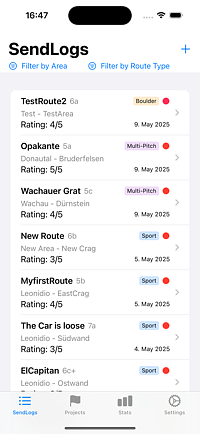
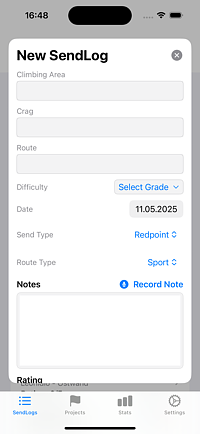
Record detailed information for each climb including route name, climbing area, date, difficulty grade, personal rating (1-5 stars), send type (redpoint, pinkpoint, on sight), and personal notes.
Attach photos directly to your climbing routes to capture beta, celebrate achievements, or document memorable climbs. Photos are stored locally and fully integrated with your send logs.
Track your climbing training sessions separately from route logs. Record duration, training type, notes, and monitor your training consistency over time.
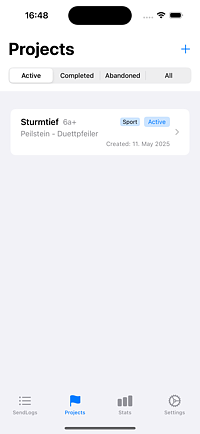
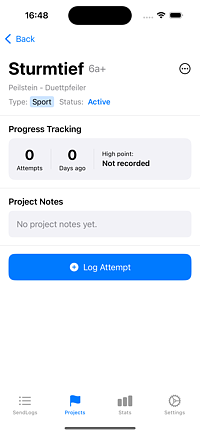
Dedicated section to manage climbing projects, track attempts, record high points, add specific notes, update status (active, completed, abandoned), and convert projects into completed sends.
Conveniently record and transcribe climbing notes using multilingual speech recognition in English, German, French, and Spanish.
Generate visually appealing climbing achievement cards with send type icons and improved layouts for easy sharing on social media.
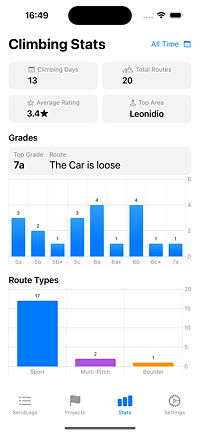
Gain insights through detailed climbing statistics including total routes climbed, average rating, top climbing areas, visual grade distribution charts, and calendar heatmap showing climbing frequency.
Distinguish between Sport, Multi-Pitch, and Boulder routes with dedicated tracking and filtering options for each climbing style.
Securely backup your logs by exporting data in CSV format within a ZIP archive. Import climbing logs effortlessly, including support for older file formats with full backward compatibility.
Optionally back up and sync your climbs, ascents, and photos across devices using Firebase. Enable Cloud Sync in Settings — the app works fully offline by default. Sign in with Apple to keep your data private and secure.
Access your climbing logbook from any browser. Enable Cloud Sync in the app, then use the web dashboard to view your climbs and training sessions from your desktop or tablet.
Open Web App →A: Yes! You can attach photos directly to each climb to capture beta, celebrate achievements, or document memorable routes. Photos are stored locally and securely on your device.
A: Absolutely. SendLog includes a dedicated Training tab where you can log gym sessions, track training duration, and monitor your training consistency over time.
A: Yes. By default, your data is stored locally on your device and never leaves it. If you choose to enable Cloud Sync, your data is stored in Firebase (Google Cloud) and protected by Sign in with Apple — no password is ever created or stored.
A: Cloud Sync is entirely optional. Turn it on in Settings → Cloud Sync and sign in with Apple. Your climbs, ascents, and photos are then backed up and accessible across all your devices. The app continues to work fully offline at all times.
A: Yes. Go to Settings → Delete My Account. All server-side data is permanently deleted, while your local climbing history on the device is preserved. The app switches back to offline-only mode automatically.
A: Yes. From the Settings screen you can export all your climbs and ascents as a CSV file inside a ZIP archive. This works whether or not Cloud Sync is enabled and gives you a portable backup you can open in any spreadsheet app.
A: Absolutely. SendLog has a dedicated Projects tab to clearly manage and track all your active, completed, or abandoned climbing projects.
A: You can quickly export your logs as a ZIP file for backup and later restore this data using the import functionality, which supports both new and older file formats.
A: Yes, voice notes can be recorded and transcribed in English, German, French, and Spanish to accommodate diverse users.
A: No. SendLog works entirely offline — all your climbing logs and statistics are always available even in remote locations. Internet is only used if you choose to enable the optional Cloud Sync feature.
A: Yes, SendLog fully supports importing data from previous versions, ensuring continuity and preservation of your climbing history.
A: The app automatically calculates and displays your highest climbing grade based on successfully completed (sent) routes, providing a clear view of your climbing progression over time.
Hi! I'm Robert, the developer behind SendLog. I created this app as a passionate climber who wanted a simple yet powerful way to track climbing progress. I'm constantly working to improve the app based on user feedback and my own climbing experiences.
Have suggestions or feature requests? Reach out to me on Bluesky: @ruzitschka.at or send a mail to support@sendlog.at